
Denny’s App 2026: The Complete Guide to Download, Features, Ordering, Rewards, and Fixing Common Issues
My neighbor Sarah swore off the Denny’s app after one bad experience. She sat in her car in the parking lot for 23 minutes, clicking through a broken checkout screen that kept rejecting her card, while her pancakes cooled down inside. She gave up, walked in, ordered at the register, and deleted the app that same night.
Six months later, she told me she’d reinstalled it — because her coworker mentioned he’d gotten a free Everyday Value Slam for his birthday and another free menu item just for completing an in-app challenge during a road trip. He’d earned those rewards by doing nothing extra except opening the app and scanning a QR code when he paid.
That’s the exact tension with the Denny’s app in 2026. When it works well, it’s a genuinely useful tool that gets you free food, faster reordering, real-time delivery tracking, and exclusive deals you simply won’t find anywhere else. When it misbehaves — and yes, it still does, we’ll get into that — the frustration is real and well-documented.
This guide gives you the complete picture: what the app does, how to download and set it up correctly, how every major feature actually works, what the known bugs are and how to work around them, and how to squeeze maximum value out of every single visit to Denny’s. No sugarcoating. Just honest, 2026-current information.


View Complete: Denny’s Menu With Prices And Calories
What Is the Denny’s App and What Can It Actually Do?
The Denny’s app — available on both iOS and Android — is the brand’s official mobile platform for ordering, rewards tracking, location finding, and exclusive deal access. The current version as of late 2025 is 6.0.5, released November 11, 2025, and it represents the most stable and polished iteration the app has seen since Denny’s overhauled its entire digital infrastructure in 2021.
Here’s what the app is genuinely built to do in 2026. It lets you place orders for pickup, curbside, or delivery directly from your phone. It houses your Booth Rewards digital wallet, including your BoothBucks balance, active offers, and QR code for in-restaurant check-ins. It shows you the full Denny’s menu with current pricing at your selected location. It lets you save your favorite orders for one-tap reordering. And it sends you push notifications for personalized offers, reward expiration reminders, and active Rewards Challenges — the limited-time bonus point opportunities that most casual users completely miss.
The app does not replace the Denny’s website for every task. If you prefer desktop ordering or browser-based account management, dennys.com/order handles those functions well. But for in-restaurant visits — particularly for scanning your QR code to earn BoothBucks or applying a reward before your check closes — the app is your fastest and most reliable tool.
One thing worth knowing upfront: the app earned a complicated reputation. Enough Google Play and App Store reviews document real checkout failures, store location bugs, and payment processing errors that it would be dishonest to pretend they don’t exist. What’s also true is that version 6.0.5 shows meaningful improvement over earlier releases, and the majority of issues have specific workarounds. We cover all of them in this guide.
How to Download and Set Up the Denny’s App Correctly in 2026
Getting the app running properly from day one prevents most of the headaches that drive negative reviews.
For iPhone users: Search “Denny’s” in the App Store. The correct app is published by Denny’s, Inc., shows the red Denny’s logo, and has the app ID 527548554. It requires iOS 9.0 or later and runs on Mac with Apple Silicon as well. Install it, open it, and tap “Sign Up” rather than “Sign In” if you don’t have an existing account.
For Android users: Find it on Google Play by searching “Denny’s” — look for the app by Denny’s, Inc. with package ID com.dennys.mobile. It requires Android 10 or higher as of version 6.0.5. The APK is 94MB, so download over Wi-Fi if you’re watching your data. If you’ve had a previous version installed, force-clear the app cache before launching the new version. That one step eliminates the majority of the post-update bugs reported in January 2026 reviews.
Setup steps that actually matter
Create your account using your real birthday. That date triggers your annual free birthday slam — a mistake here means you miss out every single year. Enter your phone number accurately, because that number is your primary identifier at the register when you don’t have your phone handy or when the QR code scanner isn’t cooperating.
After registration, Denny’s sends a confirmation email. Open it and click the verification link before you do anything else. This step unlocks your Welcome Offer — a free menu item redeemable on your next visit. Users who skip confirmation and wonder why their reward never appeared almost always trace it back to this unclicked email.
Add your preferred Denny’s location during setup. The app performs significantly better — and loads menus faster — when it has a home location cached rather than searching from scratch every time you open it. This also prevents the infuriating “redirect to store selection” loop that many Google Play reviewers documented in early 2026.
Save your payment information in the app wallet before your first order. Entering card details at checkout while hungry and impatient is where errors compound. The app supports credit and debit cards, Apple Pay on iOS, and Google Pay on Android.
The Denny’s App Home Screen: What You’re Looking At
When you open the app after setup, the home screen has four core sections worth knowing.
The top section shows your current BoothBucks balance and your nearest active reward. If you have a reward ready to use, it appears here as a prominent tile — this is intentional, because Denny’s wants you to see it and use it on your next visit before it expires.
Below that is the My Offers section. This is where personalized deals live — the ones built from your order history and dining patterns. A regular breakfast customer might see a 2x BoothBucks promotion on morning visits. A frequent burger orderer might receive a discount on a new menu item in that category. These offers are not available to non-members and don’t appear anywhere except inside your logged-in account.
The Challenges section sits lower on the home screen and is the most underutilized feature in the entire app. Challenges are limited-time tasks — “visit Denny’s three times this month,” “order breakfast two Saturdays in a row,” “try this new item” — that reward you with bonus BoothBucks significantly above the standard 10-per-dollar earning rate. In January 2026, Denny’s ran a Good Fortune Challenge tied to Lunar New Year with themed UI updates and elevated bonus point opportunities. Most users never noticed it. Check Challenges every time you open the app, because they rotate monthly and expire without extension.
The bottom navigation includes Home, Order, Rewards, Locations, and More. Order takes you directly into the full menu at your saved location. Rewards shows your complete BoothBucks history, active offers, and the QR code you scan at the register.
How to Order Food Through the Denny’s App Step by Step
This is where the app adds real convenience — and where bugs most commonly appear. Here’s the process that works reliably based on current user experience data through early 2026.
Open the app and tap Order at the bottom. Confirm your location — this is the step that causes the redirect loop some users experience. If the app keeps bouncing you back to location selection, force-close the app, reopen it, and select your location from the Locations tab before tapping Order. That sequence breaks the loop in virtually all documented cases.
Browse the menu by category: Breakfast, Lunch and Dinner, Beverages, Sides, Kids’ Menu, and so on. The menu reflects your selected location’s actual available items, which is why locations sometimes show different items. Franchise locations across Denny’s 1,459-plus restaurants don’t all carry every menu item, particularly seasonal or regional offerings.
Customize your order on the item detail screen. This is genuinely well-designed — you can swap sides, modify egg style, add or remove toppings, and note dietary preferences, all within the item customization flow. The customization data carries through to the kitchen and applies to both pickup and delivery orders.
At checkout, select your fulfillment method: pickup (you walk in and collect), curbside (you wait in your car and a server brings it out), or delivery (driver brings it to your door). Delivery uses Denny’s own fulfillment network — not third-party apps — meaning your Booth Rewards and BoothBucks apply fully, which they don’t when ordering through DoorDash or Uber Eats directly.
Apply any active rewards before tapping Place Order. The discount shows as a line item in your order summary. Confirm the total looks correct before submitting payment.
If you hit the “unable to take your order at this time” error at payment — one of the most-reported issues in 2025 and early 2026 — try these steps in order: switch from Apple Pay/Google Pay to a manually entered card, or vice versa; clear the app cache and retry; or check whether your selected location is listed as open for the order type you selected (the app occasionally shows a location as available for pickup when that specific location has paused online orders, usually during holiday menu transitions).
For families and regular visitors, saving your most-used order as a Favorite takes about five seconds. The next time you open the app, you can reorder with two taps. That feature alone is worth keeping the app installed even if you primarily dine in.
To explore what’s currently on the menu before you order, the Denny’s full menu guide on DennyMenu.com is updated regularly and lets you browse without needing the app open.
How the Denny’s App Handles BoothBucks and Rewards
The app is your rewards command center, and this is where it performs most consistently in 2026.
Your BoothBucks balance is displayed prominently and updates within 24 to 48 hours after a qualifying purchase — not always instantly, so don’t panic if your post-visit balance hasn’t refreshed by the time you get home. If points are missing after 48 hours, contact Denny’s support through the app’s Help section with your visit date and receipt details.
To earn points during an in-restaurant visit, open the app, tap Rewards, and show your QR code to your server before the check is closed. Alternatively, give your phone number at the register — no app required for that method. Both approaches credit the same BoothBucks to your account.
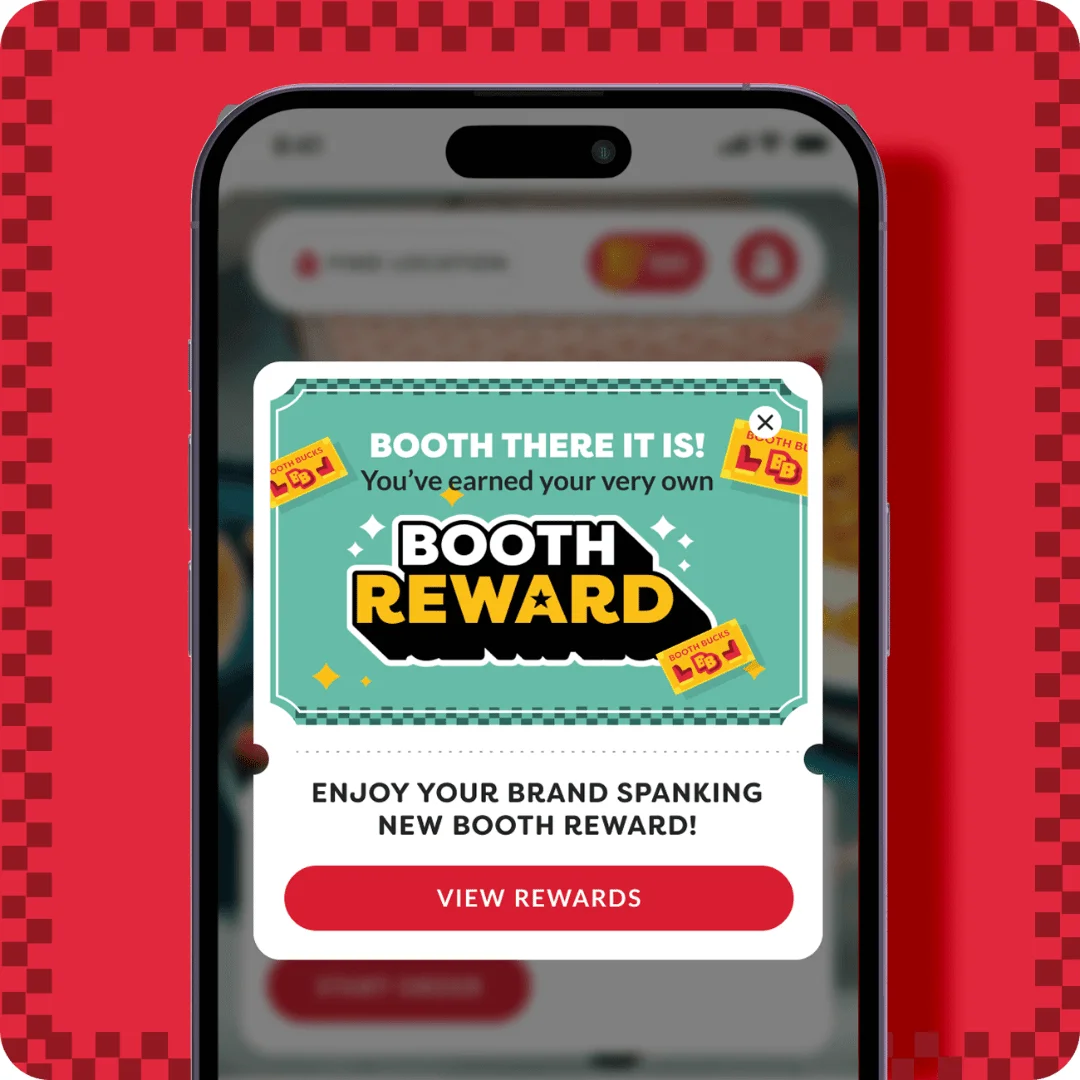
When you reach 600 BoothBucks, a Booth Reward appears in your account automatically. You don’t need to do anything to trigger it — the system deposits it for you. That reward lets you choose from over 40 menu items and is valid for 60 days from the date it’s deposited.
The Challenges section of the app is where the real BoothBucks acceleration happens. During active challenges, completing the specified task earns bonus points well above the standard rate. The Good Fortune Challenge in January 2026 offered elevated rewards for completing visit-based milestones. These challenges are time-limited and location-specific in some cases, so the only way to catch them is checking the app regularly.
One critical thing about reward redemption: the app’s QR code for rewards must be scanned before your server closes the check. This is non-negotiable and cannot be reversed. If you finish your meal and realize you forgot to apply your reward, it remains in your account for future use — but it doesn’t roll into a credit on a past order. Build a habit of opening the Rewards tab the moment you sit down, before you order, so the QR code is ready when the check arrives.
For the full breakdown of how BoothBucks accumulate and expire, the Denny’s Rewards guide on DennyMenu.com covers every detail of the program alongside the app.
Denny’s App Ordering vs. Third-Party Delivery Apps: What’s the Difference?
This comes up constantly and the answer matters financially.
When you order through the Denny’s app or dennys.com directly, your BoothBucks are credited in full, your Booth Rewards apply at checkout, and you benefit from any personalized member offers in your digital wallet. You’re also getting Denny’s baseline pricing without the markup that third-party platforms add.
When you order through DoorDash, Uber Eats, or Grubhub, your rewards don’t transfer. You won’t earn BoothBucks. You can’t apply a Booth Reward to the order. The platform fees and service charges often push the total cost meaningfully higher than ordering directly, and delivery fees on third-party platforms can add $3 to $7 or more on top of the menu price.
The one scenario where third-party delivery makes sense is when there’s a platform-specific promotion — free delivery weekend, new user discount — that exceeds the value of the BoothBucks you’d forgo. Do the math on any specific order. Most of the time, ordering directly through the Denny’s app wins on total cost plus rewards value.
Common Denny’s App Problems in 2026 and How to Fix Them
Let’s be direct about this because thousands of people are dealing with these issues and deserve working solutions rather than vague advice.
The honest assessment: the Denny’s app is functional and improving, but it hasn’t reached the reliability level of Starbucks, Chipotle, or Chick-fil-A’s mobile apps. The core rewards and ordering features work well the majority of the time. The friction points appear mainly during checkout and at specific locations. Knowing the workarounds removes most of the frustration.
Denny’s App Tips and Tricks Most Users Don’t Know
Here’s where regular app users pull ahead of casual ones.
Check the Challenges section every time you open the app — not just once when you download it. Challenges rotate monthly, some appear without push notifications, and they expire without warning. The Good Fortune Challenge in January 2026, for example, offered meaningful bonus BoothBucks but had zero marketing outside the app itself.
Set push notifications to “on” for the Denny’s app. The notifications most worth seeing are the reward expiration alerts (60-day Booth Rewards and 14-day Welcome Offer) and the bonus point day announcements. Turning off all notifications means you’ll miss the highest-value use cases for keeping the app installed.
Use the Favorite Orders feature for any order you’ve placed more than twice. The two-tap reorder flow saves time, reduces customization errors, and keeps your regular order consistent between visits. It’s especially useful for families who always order the same configurations.
If you visit multiple Denny’s locations — road trips, work travel — update your saved location before ordering each time. The app defaults to your last-used location, and ordering from the wrong location’s menu is both annoying and, depending on pickup method, an actual problem.
Order ahead for curbside pickup on busy weekend mornings. You submit the order before you leave home, the kitchen starts it, and you pull up to the curbside spot when you arrive. The app shows estimated ready times and, for delivery orders, real-time driver tracking. For a 24-hour diner that gets legitimately slammed on Saturday mornings, ordering ahead through the app is the best version of the Denny’s experience.
For everything about Denny’s breakfast menu you might want to order in advance, see the Denny’s breakfast menu page on DennyMenu.com before you place your order.
Denny’s App vs. Just Giving Your Phone Number: Which Should You Use?
Here’s the honest answer that Denny’s own FAQ confirms: you don’t need the app to earn or redeem BoothBucks. Giving your phone number at the register works just as well for earning points. You can manage your account entirely through dennys.com/rewards in a browser.
The app genuinely adds value in four specific situations. First, when you want to see your current BoothBucks balance and active offers before sitting down. Second, when you want to show a QR code for faster checkout. Third, when you want to place a pickup, curbside, or delivery order from home. Fourth, when you want to access and complete active Challenges that don’t appear anywhere except the app.
If you only dine in casually and don’t care about ordering from home or tracking your balance in real time, giving your phone number at the register and checking your account balance occasionally at dennys.com is a perfectly valid approach. The app is additive, not mandatory.
That said, the Challenges feature alone is worth having the app for. In a typical month, Challenges can accelerate your BoothBucks earning by 20 to 30 percent above the baseline rate — which meaningfully compresses the time between free rewards.
The Bottom Line on the Denny’s App in 2026
The Denny’s app isn’t perfect. If you’ve been burned by checkout errors, location bugs, or a QR code that wouldn’t scan when you most needed it, that frustration is completely valid. Version 6.0.5 has improved the experience in measurable ways, but there’s still meaningful ground to close before it competes with the most polished restaurant apps in the industry.
Here’s what’s undeniably true: the app is the only way to access Rewards Challenges, the only place to see your personalized offers in real time, and the fastest path to placing an order for pickup or curbside before you arrive. Denny’s 5.5 million Rewards members who use the app visit more often and get more free food than non-members. That’s not a coincidence — it’s the compounding effect of consistently earning BoothBucks, catching bonus point opportunities, and actually using rewards before they expire.
The people who get the most value from Denny’s aren’t the ones who tip the waiter more or order the most expensive items. They’re the ones who remembered to open the app.
For everything else you need to maximize your Denny’s visits — current menu items, specials, nutritional info, and deals — explore the full resource library at DennyMenu.com.
Have you had a great experience with the Denny’s app, or is there a bug that’s still giving you trouble? Drop it in the comments — your experience might save someone else thirty minutes in a parking lot.